SeaReady app · Ship operations & crew
Charter days (84-day limit)
Marshall Islands YET or PYLC yachts: log each charter, see the days used this calendar year against the 84-day limit, export the record.
Updated 2026-11-09 · SeaReady’s own words. The app changes often — if a screen looks different from this page, tell us from Help → Suggest an improvement.
What it is for
The "Charter days (84-day limit)" tool counts the charter days of a Marshall Islands private yacht that may charter for a limited time: a Yacht Engaged in Trade (YET, 24 m or more) or a Private Yacht Limited Charter (PYLC, 18 m or more and under 500 GT). The RMI Yacht Code MI-103 lets these yachts charter for no more than 84 days per calendar year, counted cumulatively.
MI-103 does not say how a part day counts, so SeaReady counts every calendar date the yacht is under charter, the first and the last day included. A date shared by two periods is counted once, and a charter over New Year is split between the two years.
Who can use it
Yachts only (the tool shows in the menu when the ship type is Yacht). Normally the Master or the purser keeps it. Shared through the ship file on Officer Pro or a ship licence; on Free and Crew it stays on your phone.
Step by step
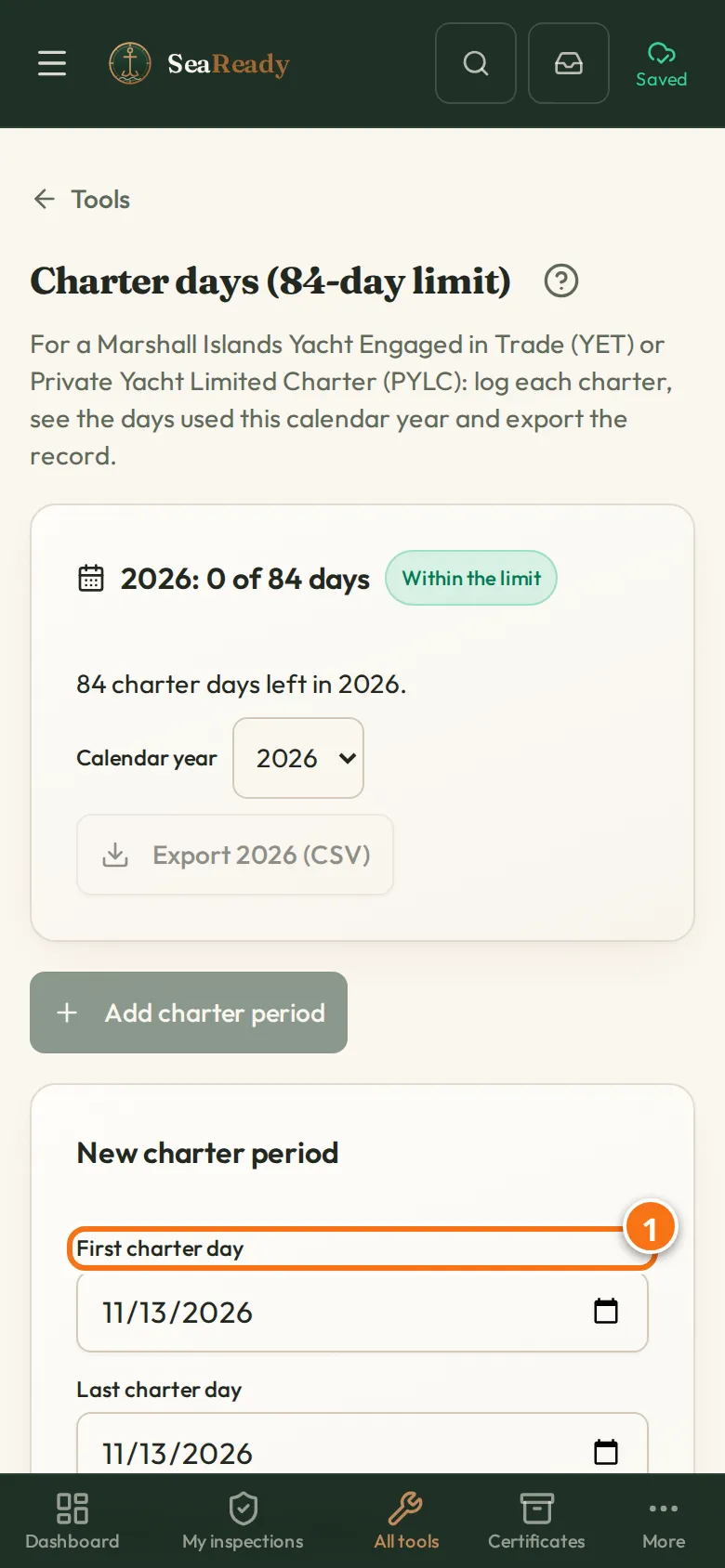
- Open "Charter days (84-day limit)" from the Tools page and tap "Add charter period".
- Enter the "First charter day" and the "Last charter day", the "Charterer / contract reference", "Guests on board", the "Cruising area / jurisdiction" and any "Notes". The form shows how many charter days the period has. Tap "Save".
- Read the card at the top: the days used in the calendar year, the days left, and how many are already done and how many are booked after today. Choose another "Calendar year" to see an earlier year.
- Tap the export button for the record of the year shown (for example "Export 2026 (CSV)"; it carries the year you chose under "Calendar year"): one line per period with its days, the days new to the year, the running total and the total against 84.
Tips
- Log booked charters too: the card counts them, so you see before the season whether the bookings fit in 84 days.
- The card turns amber from 70 days used (SeaReady’s own reminder, not a rule), shows "Limit reached" at 84 and red "Over the limit" from day 85, with the date the limit was passed.
What the inspector looks for
- The Marshall Islands Yacht Inspector and port State control can ask how many days the yacht has chartered this year and for the YET or PYLC Compliance Certificate. The export is the record behind the answer.
Limits and good to know
- Saved on your phone; works with no signal. On Officer Pro or a ship licence it is part of the ship file: the ship’s phones sync through the SeaReady server over the ship’s Wi-Fi whenever it has internet (VSAT/Starlink) and in port; with no internet, changes are held on the phone until the connection returns. On Free and Crew it stays on your own phone.
- It counts days; it does not decide whether a voyage is a charter, and it does not replace the Administrator’s own rules on the YET or PYLC certificate. If a charter starts or ends part-way through a day, confirm the counting with the Administrator.
Related pages
- Mooring line logRecord every mooring line and tail with its certificate, use, inspections and retirement limits, and get warned before a limit is passed.
- CertificatesThe certificates your ship must carry with MISSING rows, survey windows from the anniversary, conditions of class and the crew matrix by rank.
Use it in the app
The same page sits inside SeaReady under Help → Handbook and behind the “?” in the screen’s header, and it reads offline at sea.
More in Ship operations & crew
- Checklists (your own and the ship’s)Build checklists, let SeaReady AI turn your company form into one or take a ready-made one; fill them in on the phone and see what is due.
- Build your own checklistSections, questions and answer types, limits, what a bad answer needs, follow-up questions, how often it is due and who signs.
- Turn a company form into a checklistGive SeaReady AI a Word, Excel, CSV or PDF form, photos of a paper form or pasted text and check the labelled draft it makes.
- Fill in, sign and print a checklistFill in a checklist one section at a time, raise findings from bad answers, sign on your own phone, print the record and see its history.
- Master’s crew board (checklists)For the Master: every ship checklist with last done, by whom, next due and open failed items, and each person’s records and signatures.
- Ready-made checklists (library)Over 150 ready-made ship checklists in 15 groups, in our own words with the official reference: copy one, change it, schedule it and sign it.
- MessagesAnnouncements from your Master and messages from SeaReady in one inbox that reads offline, with read receipts and sign-to-acknowledge.
- Hazard report QRQR posters on board let anyone report a hazard or near miss without logging in; the Master collects accepted reports into dated findings.
- CertificatesThe certificates your ship must carry with MISSING rows, survey windows from the anniversary, conditions of class and the crew matrix by rank.
- Rest hoursRecord your rest hours in ship’s time, see STCW/MLC breaches at once and print the record the inspector asks for.
- DrillsEvery drill your ship must hold with its SOLAS / ISPS interval, ship-type scenarios, attendance, the 25% crew-change check and lessons learned.
- Crew progressOn a ship licence the Master sees what each crew member has practised and prints it for the inspector; everyone else sees their own.
- HandoverOne dated handover record per senior rank: sections by rank and ship type, the ship’s records pulled in, signed out, re-checked and accepted.
- Catch up (welcome back)Back after weeks away? See your role now, what changed, what is out of date, re-check old answers and get a fresh readiness score.
- Your ship (Settings → Vessel & crew)Set up or join your ship in Settings: join codes, ranks and rights, seats, handover, the company licence and crew groups on personal plans.
- LSA / FFA service trackerLife-saving and fire-fighting items for your ship and lifeboat type, next service worked out from the last, overdue alerts, who did what.
- BunkeringPlan each bunkering with the 90 % fill check, tick the before, during and after checks, log the BDN and samples, protest if needed, keep the history.
- Mooring line logRecord every mooring line and tail with its certificate, use, inspections and retirement limits, and get warned before a limit is passed.
- Ship/shore safety checklistOne record per port call: the ISGOTT parts for your tanker or the BLU Code list for a bulk carrier, timed repetitive checks, history and print.
- Permits, RA & toolbox talksPermits with timed gas readings, validity countdown, authorisation chain and clash warnings, plus risk assessments and toolbox talks, every stage dated.
- Record booksThe record books this ship keeps (ORB I and II, Cargo, Garbage, Ballast Water, ODS, fuel changeover): dated entries from templates, printable.
- Running hours and machinery logThe machinery of your ship type with dated counter readings, service tasks and the date each one falls due at the rate the machine runs.
- Nameplate troubleshooterPhotograph a machine nameplate and the AI tells you what the machine is, its ratings and its common faults.
- Printable formsPaper forms for your ship type: permits, pre-arrival, arrival/departure, pilot card, anchoring, heavy weather, cargo, garbage, standing and night orders.
- Medicine chest & medical logMedicine chest inventory by category, controlled drugs register with two signatures, private medical log, TMAS card, MFAG antidotes and the medical guides.
- Weather & portsA 3-day wind, wave and swell forecast for any port or position, kept on the phone for offline use, plus links to official ship records.