SeaReady app · Ship & crew
Build your own checklist
Sections, questions and answer types, limits, what a bad answer needs, follow-up questions, how often it is due and who signs.
Updated 2026-10-11 · SeaReady’s own words. The app changes often — if a screen looks different from this page, tell us from Help → Suggest an improvement.
What it is for
The builder makes a checklist the way your company writes it: sections, questions, the answer each question takes, what counts as a bad answer and what a bad answer needs, follow-up questions, how often the checklist is due and who signs it.
Who can use it
Everyone. Free plan: up to 3 checklists of your own (copies from the library do not count). Crew, Officer Pro, the 14-day trial and the ship licence: as many as you need. Ship checklists are built or changed by the Master, Chief Officer, Chief Engineer or anyone the Master allows, on Officer Pro, the trial or a ship licence.
Step by step
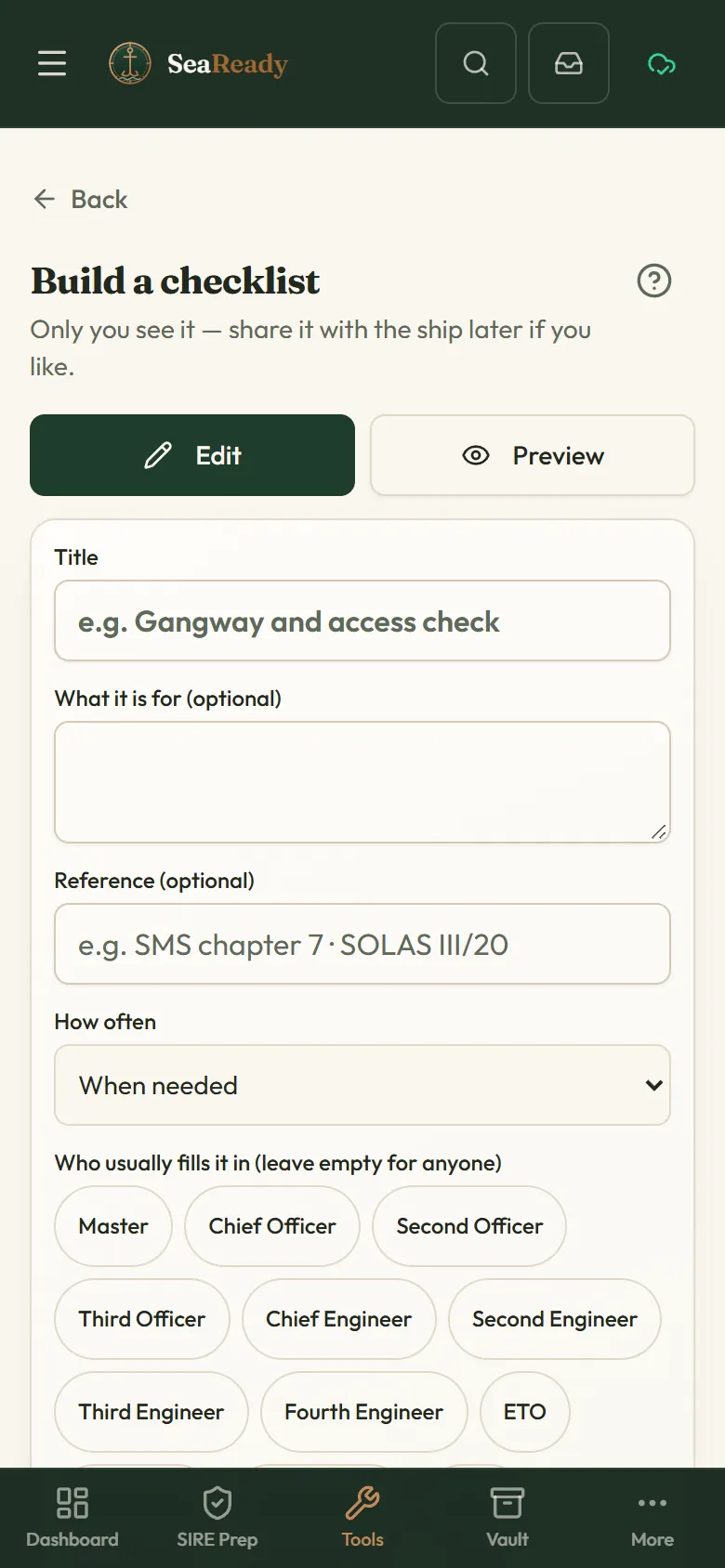
- Open "Checklists" and tap "Build a checklist" (on a ship, "New ship checklist" in the "Ship" tab makes one for everyone aboard).
- Give it a title, set "How often" (daily, weekly, monthly, every few days, or at an event such as departure, arrival, cargo work, bunkering or a drill) and the sign-off: which ranks sign, 1 or 2 signatures, and whether "The Master countersigns".
- Add sections and questions. Tap a question to choose its "Answer type": yes/no (with N/A if you allow it), a number with lower and upper limits and a unit, text, a date, a photo, a signature, pick from a list, or an information line with no answer.
- For each question say whether it is required or "Critical", which answer is the bad one, and what a bad answer needs: a note, a photo or a finding. Use "Show only if…" to make a follow-up question appear only after a given answer to an earlier one.
- Tap "Done" to keep the question, "Preview" to try the whole checklist (nothing is saved), then "Save checklist" — or "Save as draft" to finish it later.
- On a ship with Officer Pro, the trial or a ship licence, "Share to ship" on your own checklist puts a copy in the ship file for everyone aboard.
Tips
- Limits do the checking for you: a reading outside them turns red straight away and asks for its note, photo or finding.
- Mark as "Critical" only the questions that would stop the job; a critical bad answer is shown first in the record.
- If a question sheet closes by accident, your unsaved changes are kept: open the question again, then tap "Done" to keep them or "Cancel" to drop them.
- A checklist is never deleted: "Archive" hides it and keeps its records.
Limits and good to know
- Up to 40 sections and 300 questions per checklist; a pick-from-a-list question has up to 12 choices; follow-up questions go one level deep.
- Free plan: a 4th own checklist opens the plans instead of the builder; archive one to make room.
- Only the Master, Chief Officer, Chief Engineer and anyone the Master allows can change the ship’s checklists — our server puts anyone else’s change back.
Related pages
- Checklists (your own and the ship’s)Build checklists, let SeaReady AI turn your company form into one or take a ready-made one; fill them in on the phone and see what is due.
- Turn a company form into a checklistGive SeaReady AI a Word, Excel, CSV or PDF form, photos of a paper form or pasted text and check the labelled draft it makes.
- Fill in, sign and print a checklistFill in a checklist one section at a time, raise findings from bad answers, sign on your own phone, print the record and see its history.
- Ready-made checklists (library)Over 150 ready-made ship checklists in 15 groups, in our own words with the official reference: copy one, change it, schedule it and sign it.
Use it in the app
The same page sits inside SeaReady under Help → Handbook and behind the “?” in the screen’s header, and it reads offline at sea.
More in Ship & crew
- Checklists (your own and the ship’s)Build checklists, let SeaReady AI turn your company form into one or take a ready-made one; fill them in on the phone and see what is due.
- Turn a company form into a checklistGive SeaReady AI a Word, Excel, CSV or PDF form, photos of a paper form or pasted text and check the labelled draft it makes.
- Fill in, sign and print a checklistFill in a checklist one section at a time, raise findings from bad answers, sign on your own phone, print the record and see its history.
- Master’s crew board (checklists)For the Master: every ship checklist with last done, by whom, next due and open failed items, and each person’s records and signatures.
- Ready-made checklists (library)Over 150 ready-made ship checklists in 15 groups, in our own words with the official reference: copy one, change it, schedule it and sign it.
- MessagesAnnouncements from your Master and messages from SeaReady in one inbox that reads offline, with read receipts and sign-to-acknowledge.
- Certificate vaultKeep every ship certificate, condition of class and crew document with expiry countdowns, and print the inspector-ready list.
- Rest hoursRecord your rest hours in ship’s time, see STCW/MLC breaches at once and print the record the inspector asks for.
- DrillsPlan drills by SOLAS interval, rotate scenarios, and record muster times, debriefs and the lessons learned the inspector asks about.
- Crew training progressOn a ship licence the Master sees what each crew member has practised and prints it for the inspector; everyone else sees their own.
- HandoverWrite structured relief notes in four sections; open observations, expiring certificates and conditions of class are added automatically.
- Catch up (welcome back)Back after weeks away? See your role now, what changed, what is out of date, re-check old answers and get a fresh readiness score.
- Your ship (Settings → Ship)Set up or join your ship in Settings: join codes, ranks and rights, seats, handover, the company licence and crew groups on personal plans.
- LSA / FFA service trackerKeep the service and expiry dates of liferafts, extinguishers, EPIRB, SCBA and pyrotechnics in one list with a 30-day countdown.
- Bunkering checklistTick through the before, during and after checks of a bunkering operation, note the grades and barge, and reset for the next one.
- Mooring line logRecord every mooring line and tail with its certificate, use, inspections and retirement limits, and get warned before a limit is passed.
- Ship/shore safety checklistPrepare for the ship/shore safety checklist part by part before the terminal arrives, with remarks per part and a print-out.
- Permits, RA & toolbox talksFill in a permit to work, a 5 by 5 risk assessment or a toolbox talk on the phone, sign on the screen and print it for the file.
- Oil Record Book codesPick the engine-room operation you did and see the Oil Record Book Part I code letter, item numbers and the shape of the entry.
- Running hoursLog the running hours of each machine and its service tasks, and see what is due next by hours or by calendar.
- Nameplate troubleshooterPhotograph a machine nameplate and the AI tells you what the machine is, its ratings and its common faults.
- Printable permitsClean paper templates for enclosed space entry, hot work, working aloft and a near-miss report, with your ship name on top.
- Medicine chest guidesLinks to the two trusted medical guides for ships and a reminder of how to reach a Radio Medical doctor. No medical advice.
- Weather & portsA 3-day wind, wave and swell forecast for any port or position, kept on the phone for offline use, plus links to official ship records.